Give your Mac
room again.
Cleaners tell you “12 GB of junk” and ask you to trust them. Spaceroom shows you every item, explains why it's safe, and lets you undo it. Junk, dev leftovers and apps you forgot, all in one native Mac app.
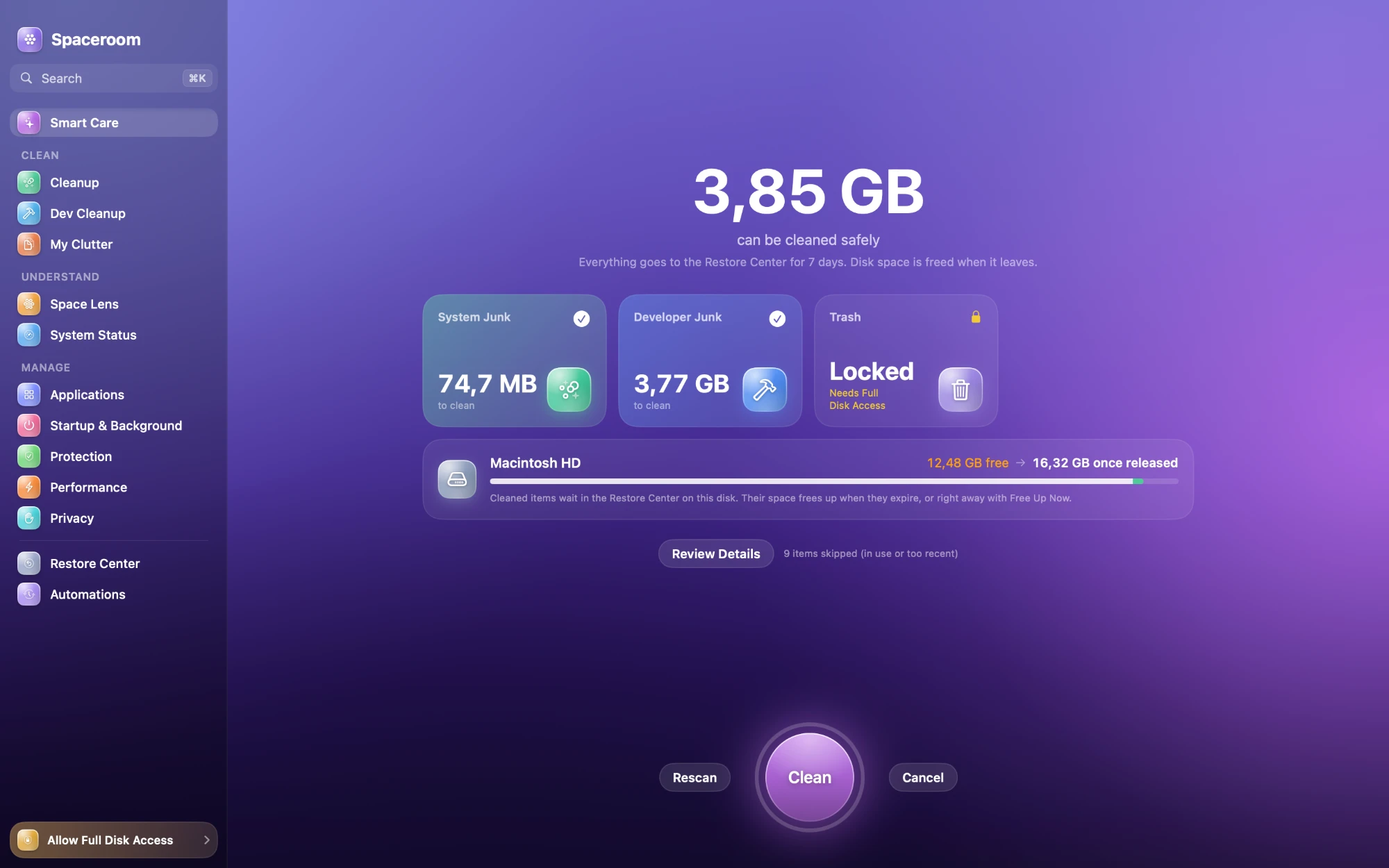
Smart Care One click to a healthier Mac.
Smart Care
Free up 3.85 GB
One scan across every module, using safe, regenerable rules only. You review it, you decide. Everything goes to the Restore Center first, so you can always put it back.
From a real scan on a 245 GB MacBook. Your numbers depend on your Mac.
- Developer junk3.77 GB
- System junk74.7 MB
- Trashneeds access
- Skipped (in use or too recent)9 items
A typical cleaner, or Spaceroom?
Most cleaners are good at one thing: big numbers. Here's what they leave out.
| Question |  Spaceroom | Typical cleaner |
|---|---|---|
| What gets removed | Every item, with its size, location and why it's safe | A total. “Trust us.” |
| Changed your mind | Restore Center keeps everything for 7 days | Deleted for good |
| Developer junk | DerivedData, simulators, npm, Cargo, Gradle… skips tools that are running | Rarely, or not at all |
| Uninstalling apps | App plus caches, logs, settings and launch agents. Personal data stays unticked | The app, maybe its cache |
| Disguised files | Programs posing as photos, invoice.pdf.app, PDFs that launch programs | Not their job |
| Your data | No account, no telemetry, all on-device | Account, analytics, cloud checks |
| Price | Free and open source (GPL-3.0) | Subscription |
Built for the way Macs actually fill up.
Caches nobody clears, simulators from three Xcodes ago, apps that leave pieces behind. Each module handles one of them, with its own colour, so you always know where you are.
Everything else.
The rest of the room, kept tidy.
Careful by design, not by promise.
Four layers stand between a scan and anything leaving its folder.
- 1
Rules
Plain JSON rules declare what may be cleaned, why it's safe, and when to skip it, like “skip while Xcode is running”.
- 2
Scanner
Expands each rule's paths, measures sizes and marks anything that's currently in use.
- 3
Safety guard
Refuses anything outside the rule's folder, behind a symlink, in protected system folders, or swapped after the scan.
- 4
Restore Center
Items are moved, not deleted: an instant rename on the same disk. They leave only when the retention period ends.
If the rule set fails to load or validate, cleaning is switched off. Scanning still works.
A real Mac app. Nothing leaves your Mac.
Spaceroom is native SwiftUI, not a web page in a window. Every scan and every analysis runs on your Mac. There's no account to make and no telemetry to opt out of.
Nothing is deleted outright. Cleaned items wait in the Restore Center for the retention period you choose (1, 3, 7, 14 or 30 days), and you can restore a single file or a whole clean-up.
Privacy cleaning never touches saved passwords or bookmarks, and refuses to run while a browser is open. Protection only reads file headers; it never opens or runs anything.
- Requires
- macOS 14 Sonoma or later
- Runs on
- Apple Silicon and Intel
- Built with
- SwiftUI, native
- Account
- None
- Telemetry
- None, all on-device
- Undo
- Restore Center, 1–30 days
- Admin tasks
- Shown, never run without the helper
- License
- GPL-3.0-or-later
- Price
- Free
Open source
Build it in a minute.
Spaceroom is in pre-alpha and a signed download is on the way. Until then, build it with Xcode. New cleaning rules are the most valuable contribution. Each one needs a “why safe” text and a test.
- Xcode 16+
- XcodeGen
- macOS 14+
# get the code
git clone https://github.com/novasilabs/spaceroom-app.git
cd spaceroom-app

# one-time
brew install xcodegen

# generate the project and open it
xcodegen generate
open Spaceroom.xcodeproj

# run the engine tests
swift test --package-path Packages/SpaceroomCore
Questions, answered.
Will it delete my files?
No. Cleanup only touches regenerable data like caches and logs, and My Clutter only shows your own files for you to decide on. Everything removed goes to the Restore Center first and stays there for 7 days by default.
Why does it ask for Full Disk Access?
macOS protects places like Safari data, Mail and the Trash. Without access Spaceroom still works. It skips those locations and tells you which ones. You can grant access any time.
Is it free? Is there a subscription?
Spaceroom is free and open source under GPL-3.0. No subscription, no account, no upsell.
Is Protection an antivirus?
No. It spots common disguises: programs named like documents, misleading names, code hidden in images, PDFs that launch programs. macOS's own XProtect keeps running alongside it.
Does it work on Intel Macs?
Yes. It runs on macOS 14 Sonoma or later, on both Apple Silicon and Intel.
What does Privacy clean? Will I lose my passwords?
History, cookies, form autofill and download history in eight browsers, plus recent-items lists. Saved passwords and bookmarks are never touched, and it refuses to run while the browser is open.
Do automations clean things without asking?
Only rules that are safe without review (the same ones Smart Care uses) run unattended, and they clean into the Restore Center unless you choose to free space right away.
Where's the download?
Spaceroom is in pre-alpha. A signed build is coming; for now you can build it from source with Xcode in about a minute.